
Sleep Cycle Sonalarm Clock2.3 - App Store
You'll be able to see results in few seconds.
Publisher Description
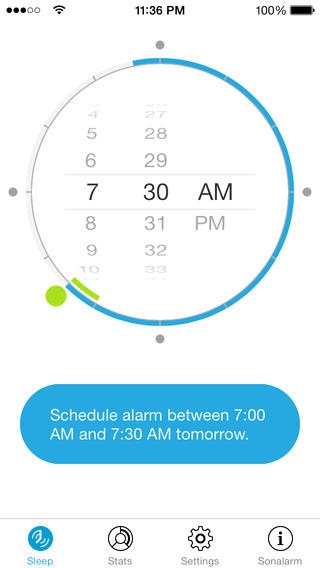
Sonalarm is the first sleep cycle alarm clock app that works from your bedside table with no additional hardware. Sonalarm reliably detects when you turn around in bed through an ultrasonic motion sensor, by making use of your iPhone s built-in audio hardware and clever programming. You don't need to share your bed with your iPhone (like it is required for the existing sleep cycle apps). With Sonalarm, your smart phone stays on the bedside table where it belongs!
To view the product video and for further details, click the "Logera Solutions GmbH Web Site" link.
Sleep research
During the night, every time you turn around, you are awake or almost awake. Normally, you just go back to sleep so fast that you won't remember it the next morning. By monitoring your movements, Sonalarm can wake you up at the best moment (when you are almost awake anyway). Sleep research has shown that you will feel more refreshed even if you woke up earlier.
Alarm time window
Sonalarm makes use of this effect. Say, you really need to get up at 7:30. That's the alarm time you set. Depending on a setting, the activation window will start 20 to 60 minutes earlier. If Sonalarm detects that you are almost awake during this period, the alarm will start and wake you up completely.
Sleep analysis and statistics
After the first night, sleep statistics will be available on the stats tab. Sonalarm analyzes your movements during the night and gives you an overview the next morning. You see when you were awake, in a light or deep sleep phase. Totals are shown below the chart.
Health integration
Sonalarm allows you to export your sleep analysis to your iPhone's Health Store so you can view it in Apple's Health app or import it into other apps. The app requires read and write access if you want to use this feature (the read access is required to enable Sonalarm to modify sleep analysis data it has previously stored).
Background operation
You can lock your screen to conserve energy if you don't need the night clock. Unless you have your iPhone fully charged, we recommend you connect it to the charger during the night.
Fall asleep to relaxing rain sounds
You may optionally make the app play relaxing rain sounds to fall asleep. The duration can be configured on the settings tab, and you can also turn off the noises there. At the end the sounds are faded out gradually.
Sonalarm is available for the iPhone 4 and newer iPhones. iPads and iPod touch devices are currently not supported, but support may be added in the future.
You should follow us on Twitter @SonalarmClock and on Facebook: https://www.facebook.com/SonalarmClock
Thanks to Siniz for the design support.
Requires iOS 6.1 or later. Compatible with iPhone 4, iPhone 4s, iPhone 5, iPhone 5c, iPhone 5s, iPhone 6, iPhone 6 Plus, iPhone 6s, iPhone 6s Plus, iPhone SE, iPhone 7, and iPhone 7 Plus.
About Sleep Cycle Sonalarm Clock
The company that develops Sleep Cycle Sonalarm Clock is Florian Student. The latest version released by its developer is 2.3.
To install Sleep Cycle Sonalarm Clock on your iOS device, just click the green Continue To App button above to start the installation process. The app is listed on our website since 2014-06-09 and was downloaded 0 times. We have already checked if the download link is safe, however for your own protection we recommend that you scan the downloaded app with your antivirus. Your antivirus may detect the Sleep Cycle Sonalarm Clock as malware if the download link is broken.
How to install Sleep Cycle Sonalarm Clock on your iOS device:
- Click on the Continue To App button on our website. This will redirect you to the App Store.
- Once the Sleep Cycle Sonalarm Clock is shown in the iTunes listing of your iOS device, you can start its download and installation. Tap on the GET button to the right of the app to start downloading it.
- If you are not logged-in the iOS appstore app, you'll be prompted for your your Apple ID and/or password.
- After Sleep Cycle Sonalarm Clock is downloaded, you'll see an INSTALL button to the right. Tap on it to start the actual installation of the iOS app.
- Once installation is finished you can tap on the OPEN button to start it. Its icon will also be added to your device home screen.
Program Details
System requirements
Download information
Pricing
Version History
version 2.3
posted on 2014-06-09
Disclaimer
Official App Store Link
We do not host Sleep Cycle Sonalarm Clock on our servers. We did not scan it for viruses, adware, spyware or other type of malware. This app is hosted by Apple and passed their terms and conditions to be listed there. We recommend caution when installing it.
The App Store link for Sleep Cycle Sonalarm Clock is provided to you by apps112.com without any warranties, representations or guarantees of any kind, so access it at your own risk.
If you have questions regarding this particular app contact the publisher directly. For questions about the functionalities of apps112.com contact us.
